# CLM
To export your e-Detailer for CLM, perform the described common steps first.
Once you reach the Export pop-up, you can select the required CLM system from the following list:
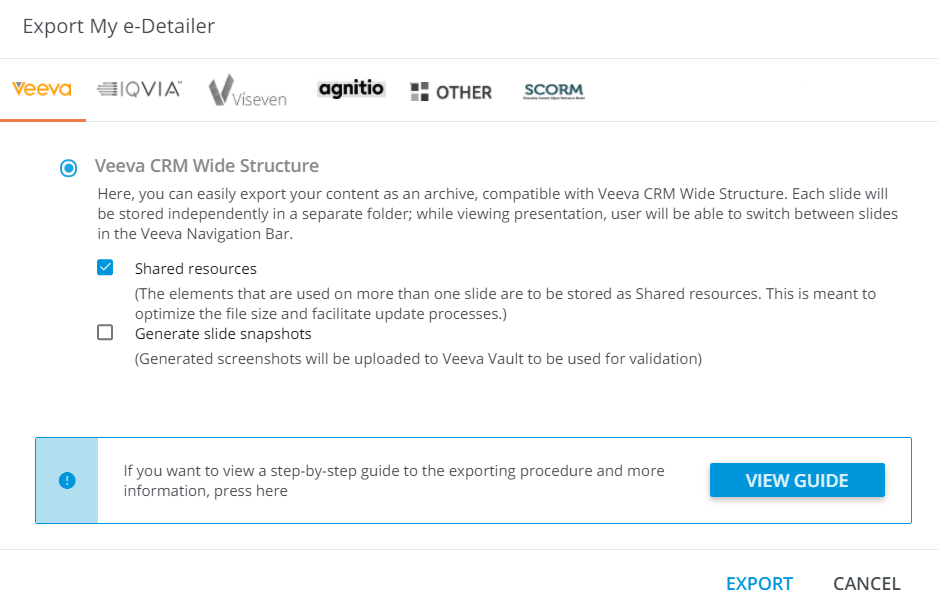
# Veeva
Veeva CRM Wide Structure(an archive with each slide in separate folder; you can switch between slides in the Veeva Navigation Bar)Shared resources(optimizes the file size and facilitates updating)Generate slide snapshots(can be used for the validation in Veeva Vault)
# IQVIA
IQVIA OCENexxus MI Multi-Sequence(compatible with the Nexxus Mobile Intelligence with the possibility to navigate between slides)Nexxus MI Single-Sequence(compatible with the Nexxus Mobile Intelligence; select this configuration if all presentation's slides are linked to the same product; features the built-in swipe between slides)Nexxus MI Single-Sequence(Enhanced Flow) (covers the Nexxus MI Single-Sequence functionality supplemented by the Generate slide snapshots feature)Generate slide snapshots(can be used for the validation in Veeva Vault)KADRIGE iDetailing(the presentation can further be used for the remote communications)
# Viseven
Viseven Single-Page Application(for further use in Viseven CRM and CLM; features the full functionality and navigation)
# Agnitio
Agnitio iPlanner(a *.zip archive compatible with the Agnitio system)Rainmaker TM Engager(the presentation can be used on mobile devices with Agnitio's Engager for Rainmaker TM)
# MyForce
SFDC PhoneGap(compatible with Mylan SFDC PhoneGap Mobile Client)
# Other
TerrasoftTeam Soft Pharma Touch CLMDataMind
# SCORM
SCORM(a SCORM-compatible build that can be widely used across eLearning platforms)
← Common steps Document →